Divi 5
- Design Variables for colors, fonts, spacing and shadows
- Option Group and Element Presets, created once
- One prompt per page, built from page blueprints
- Single-page mode for landing pages
Everything the plugin does to keep AI-built sites from looking alike.
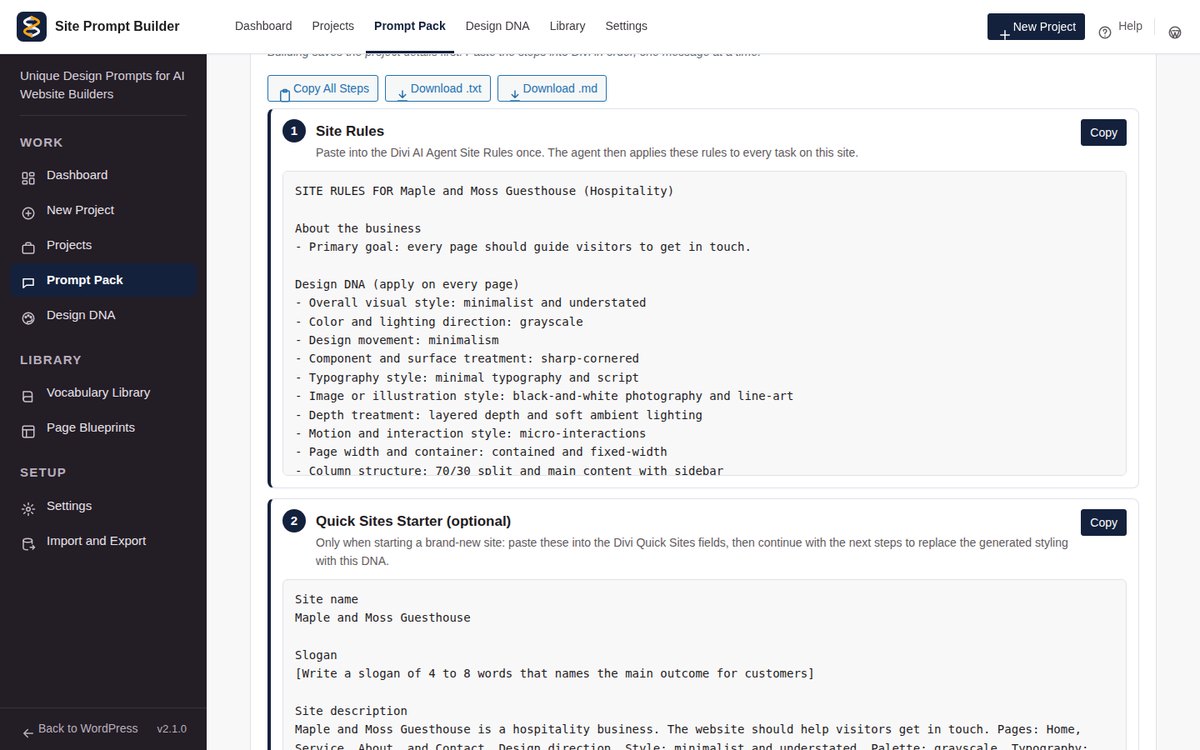
Each prompt is a numbered step with its own copy button, written for the order your builder works in.
Style, color, type, layout and copy direction, plus design tokens and a font pairing.
Copy all steps, or download the pack as a text or Markdown file for your records.
Every new design is compared with your saved projects. If it is too close to one, the plugin tries again.
Keep the picks your client loves and reroll the rest. Seeds let you reproduce any design exactly.
Colors, fonts, spacing and shadows become tokens, with contrast checked so text stays readable.
Track each client from draft to delivered. Duplicate a project to try a variation, or export it to another site.
Home, About, Services, Contact and more, each with a section order you can edit.
Every pack includes SEO, answer-first and AI citation rules, customer questions turned into FAQs, and ready-made structured data for the business.
Five short steps take a new user from a business description to ready-to-paste prompts. Every step saves as you go.
Build one landing page or add a new page to an existing site, matched to the same design system.
Overused phrases and looks are flagged and kept rare, so prompts steer away from the usual AI look.
Each builder gets its own prompt pack, in the order and format that builder works best with.
Divi is a trademark of Elegant Themes. ChatGPT is a trademark of OpenAI. Claude and Claude Code are trademarks of Anthropic. Elementor is a trademark of Elementor Ltd. Site Prompt Builder is not affiliated with or endorsed by them.
Rename the plugin, add your logo and pick your accent color. Button text contrast is worked out for you, and the plugin runs in its own clean workspace inside WordPress.